Frequently Asked Questions
About the Service

Is this service free to use?

Yes. RouteShare is free to use. However, you need to register an account to post articles and similar content.
Are there any plans for paid plans or subscriptions?
Yes. To keep the service sustainable, we are considering offering paid plans or subscriptions for some features in the future. However, we will not put paywalls on how many pieces of content you can create. We plan to keep a useful experience available for free. We will keep our support pages up to date as details are finalized, so please check there for updates.
Can I use it on a smartphone?
Yes. You can browse and use RouteShare on a smartphone. If you are on a smartphone, we recommend using the mobile app version.
What can I do with an account?
With an account you can create and edit content, follow other users, give Nice Routes (likes), clone content, and more.
What do I need to register an account?
You need an email address or a Google account.
Is there a limit on how many articles I can post?
No, there is no upper limit. You can post as many articles as you like.
Do I need to download any software to use the service?
No. RouteShare works in a web browser, so no download is required. We also offer smartphone apps, and we recommend the app version if you are using a smartphone.
About the Features
What is a Quick Post?
A Quick Post is content you can create quickly and easily. You can post with just text and photos, and optionally attach location information. Use it to share a view you happened to see while traveling, or to jot down your day-to-day thoughts.
What is a Route Article?
A Route Article is content for introducing routes and spots in more detail. Unlike Quick Posts, attaching location information is required. The text can be freely edited like a blog, with inline images and in-text links, allowing you to build rich, flexible content.
What is a Gadget Post?
A Gadget Post is content for introducing gear and equipment such as your vehicle, touring gear, or camping equipment. Like a Route Article, you can compose it with images and text in a blog-like format. You must select a category from the Gadget category set.
What is the Map Editor?
The Map Editor lets you add routes (lines), spots (points), and shapes (figures) on a map based on the Geospatial Information Authority of Japan (GSI) base map. Geographic search is also available.
What is the article creation feature?
In addition to entering information on the map, you can write explanations that the map alone cannot express, using text, images, lists, and more, similar to a blog or journal.
Can I upload images? What happens to uploaded images?
Yes, you can upload images. You can attach images to your content for display. Uploaded images are linked to their post, so to remove an image you need to delete the content itself.
Can I export my data?
Data export is not supported at the moment, but we plan to add it in a future update.
I want to share content only with specific people — is that possible?
For Route Articles, you can change the visibility setting. You can share with specific people who know the URL. Note that there is a limit of 10 such shared articles.
What is location image generation?
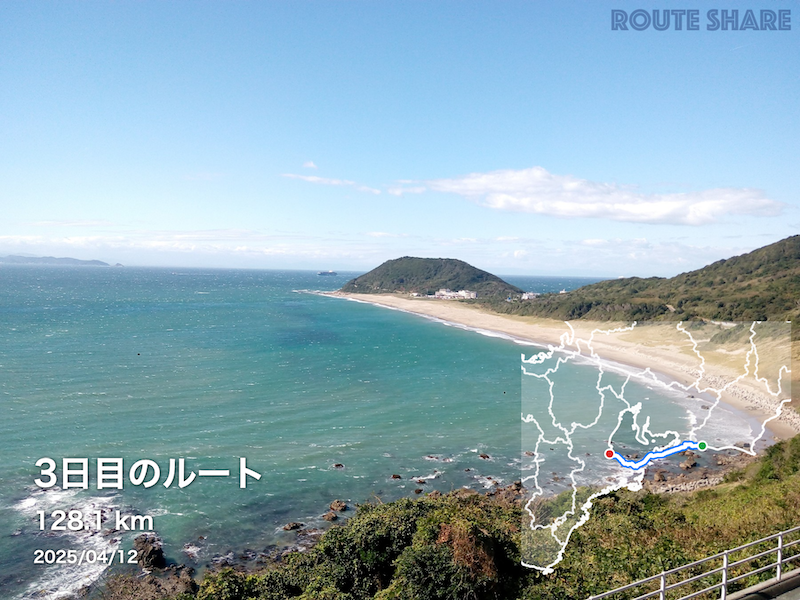
This feature combines images attached to Route Articles or Quick Posts with the location information you have set, to generate stylish map-embedded images. It is handy for sharing on social media.
Looking for a more detailed guide?
Let's share your recommendations and itineraries with Route Share.
By creating your account, you will be able to create your posts, save other articles and so on.
What you can do with routeshare→